
How to Find Q1 SCI Journals in Your Field (A JCR Guide)
Publishing in a "Q1 journal" is a goal for many researchers, as it signifies that the journal is in the top 25% of its field based on citation metrics. This is a hallmark of high impact and prestige. However, the term "SCI" and the "Q1" designation can be confusing.
This guide will provide the official, definitive method for identifying Q1 SCI-indexed journals in your specific research area using the correct industry-standard tools.
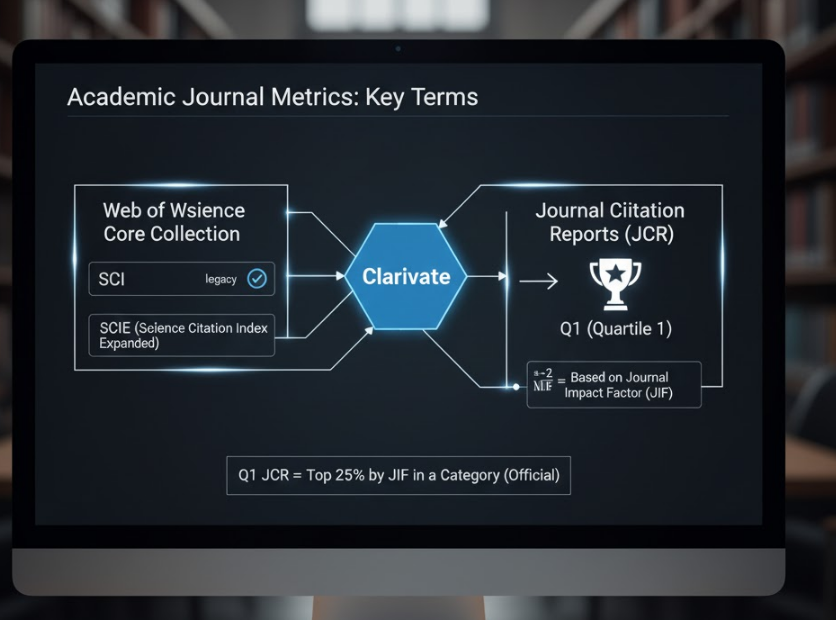
Understanding the Key Terms
Before we begin, let's clarify the terminology:
-
SCI (Science Citation Index): This is an older term. The modern, more comprehensive index is the SCIE (Science Citation Index Expanded). When people say "SCI journal," they almost always mean a journal indexed in the SCIE.
-
Source of Truth: Clarivate & JCR: The SCIE is part of the Web of Science (WoS) Core Collection, which is owned by a company called Clarivate.
-
Q1 (Quartile 1): This ranking is not provided by the Web of Science directly. It comes from a separate, related Clarivate product called the Journal Citation Reports (JCR). A journal is Q1 in a specific category if its Impact Factor (IF) is in the top 25% of all journals in that category.
-
The Golden Rule: The only official source for determining a journal's Q1 status based on Impact Factor is the Journal Citation Reports (JCR). Do not rely on unverified websites or lists, as they are often outdated or inaccurate.
Step-by-Step Guide to Finding Q1 Journals Using JCR
You must have access to the Journal Citation Reports (JCR) to perform this search. Most research universities and institutions provide this access through their library portal.
Step 1: Access Journal Citation Reports (JCR) Log in to your institution's library website and find the database link for "Journal Citation Reports" (owned by Clarivate). If you cannot find it, ask your librarian for assistance.
Step 2: Navigate to the Journal Browser Once you are in the JCR database, look for an option to "Browse Journals" or "View all journals." This will take you to the main search and filtering interface.
Step 3: Select Your Subject Category (Your "Field") This is the most important step for finding journals in your field.
-
Look for a filter option labeled "Categories" or "Browse Categories."
-
Search for your specific research area (e.g., "Computer Science, Artificial Intelligence," "Materials Science, Multidisciplinary," or "Oncology").
-
Select the category (or categories) that best fit your work. A journal can be in multiple categories and may have different quartile rankings in each one.
Step 4: Apply the Correct Filters Now that you are viewing journals in your chosen category, apply the following filters:
-
Filter by Index: Select "SCIE" (Science Citation Index Expanded). This ensures you are only looking at "SCI" journals.
-
Filter by Quartile: Select "Q1" in the "JIF Quartile" or "Journal Impact Factor Quartile" filter section.
Step 5: Review Your Q1 Journal List The list of journals now displayed on your screen is the official list of Q1, SCIE-indexed journals for the selected category in the most recent JCR year.
You can click on any journal in this list to see its detailed profile, including its exact Impact Factor, its ranking in other categories, and its citation trends.
What About Scopus? A Note on Scopus vs. WoS
You may also hear about "Q1" in the context of Scopus (Elsevier's database). It's crucial to understand:
-
Scopus uses a different metric: Scopus has its own quartile rankings based on a metric called CiteScore.
-
WoS (JCR) uses Impact Factor: JCR quartile rankings are based on the Journal Impact Factor (JIF).
A journal can be Q1 in JCR (WoS) but Q2 in Scopus, or vice-versa. When your institution or a grant application asks for a "Q1 SCI journal," they are referring to the JCR (Impact Factor) ranking from Clarivate.
Conclusion
To find legitimate Q1 SCI journals, you must use the official source: Clarivate's Journal Citation Reports (JCR). By logging in through your institution, filtering by your subject category, and selecting the "SCIE" index and "Q1" quartile filters, you can generate a reliable and accurate list of the top-tier journals in your field. Always verify a journal's status in the JCR before you decide to submit your manuscript.